
Everything you'd cobble together.
One platform you own.

Models, agents, voice, RAG and real collaboration, all shipped and live. Self-host it, or walk away with your data any time.

60+
AI models, switchable mid-conversation
1–4
Parallel responses, side by side
13
Artifact types, version-controlled
8
Ways in: five integrations, the API, the CLI and webhooks

Start with the work you need to finish.

Four ways to turn a brief, a project or a set of sources into something you can use. Each workflow names where it runs and what you take away.

From a brief to usable creative assets

Web and Desktop

  1. Bring your idea

  2. Make it your own

  3. Take the assets with you

Peek at the details

For studios and content teams

Bring
A launch brief, brand colors and a reference image.
Do the work
Develop the concept, generate a visual, then ask for edits. Use the media services available on your account.
Take away
Saved image files and a visual direction ready for the next stage of production.

Media generation uses separate service credits. Available models vary by deployment.

Describe it. Adjust it. Export the model.

Desktop

  1. Sketch a prop idea

  2. Shape it in 3D

  3. Export your model

Peek at the details

For indie game makers and visual prototypers

Bring
A prop idea, dimensions and parameters you want to change.
Do the work
Build in the live 3D pane, adjust parameters and inspect the model from different angles.
Take away
An editable model source and a GLB you can open in the next tool in your workflow.

Inspect dimensions and materials in your target tool before using the exported asset.

Give your client a report they can use

Web workspace

  1. Gather your sources

  2. Build a cited report

  3. Choose who sees it

Peek at the details

For consultants and research teams

Bring
A client question, a source set and sample data.
Do the work
Synthesize the sources, create an interactive report, choose its audience and revise it when the inputs change.
Take away
A shareable report page with an explicit reporting date and a deliberate update process.

Revise and publish updates manually. Sharing modes depend on your workspace.

Choose the model for the job

Desktop

  1. Bring your project

  2. Pick local or hosted

  3. Keep the work together

Peek at the details

For teams with their own model server

Bring
Your project, a local or saved model server, and access to hosted models.
Do the work
Use your model server for one task and deliberately choose a hosted model for another, in the same workspace.
Take away
Results from both routes with the project and tools ready for the next task.

Tool availability varies by model and mode. External services can still send data outside your machine.

Explore workflow guides

What's inside.

Switch between GPT, Claude, Gemini, Llama, Grok and more mid-conversation, without losing context.

  • Every major lab

    OpenAI's latest including O-series reasoning, Anthropic's full Claude lineup, and Gemini with 1M+ token context.

    • GPT-6.1 Sol
    • Claude Opus 5.5
    • Gemini 3.1 Pro Preview
    • O3
  • Parallel responses

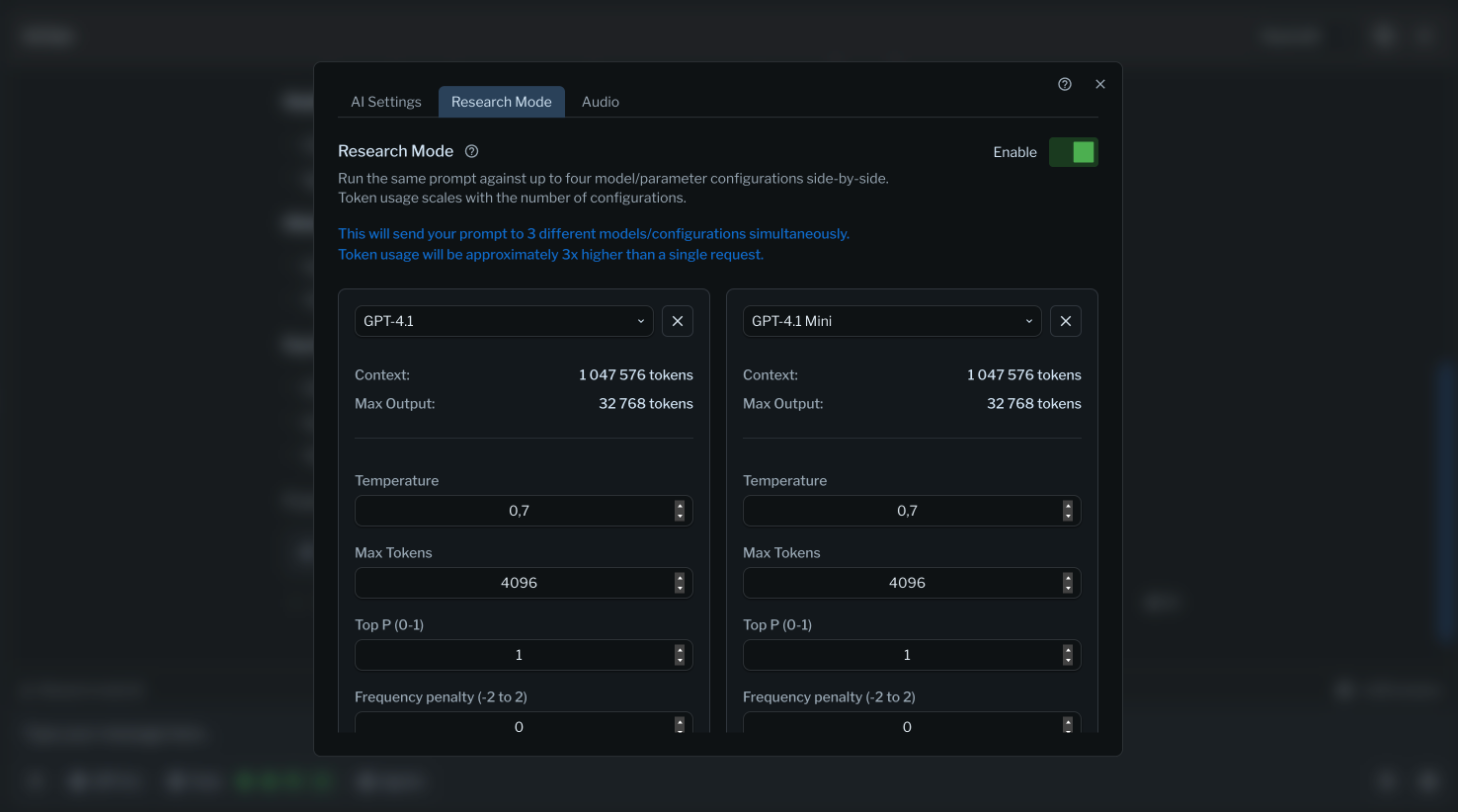
    Get 1–4 simultaneous responses from different models, compare them side by side, and pick the best answer.

  • Conversation forking

    Branch conversations like git branches and explore new directions without losing the original thread.

  • One bill, no lock-in

    One bill across every model, and credits that roll over for 90 days.

All 60+ models →

Agents with unique voices collaborate on complex tasks, and Quest Master plans and runs multi-step work on its own.

  • Personality engine

    D20 character sheets: 20 motivations, 20 flaws, 20 quirks and 7 response styles.

  • Multi-agent collaboration

    Specialized agents work on one response together, such as a legal agent paired with a technical one.

  • Quest Master

    Breaks goals into steps, tracks progress visually, retries on errors, and asks for approval on critical decisions.

  • Voice agents

    Join meetings, respond when called on, transcribe in real time, and write up summaries and action items.

React components, Mermaid diagrams and more: 13 artifact types with version control, live preview and real-time collaboration.

  • React components

    Live preview with hot reload, TypeScript and sandboxing.

  • Mermaid diagrams

    8+ diagram types with real-time rendering.

  • Version control

    Branching, merging and SHA-256 change tracking.

  • Python Playground

    Write and run Python in your browser with an AI pair programmer. No setup, no installs.

Mementos capture important information automatically and recall it when it is relevant.

  • Smart document processing

    PDF, DOCX and XLSX with intelligent chunking.

  • Cross-project search

    Find anything across all your work instantly.

  • ChatGPT and Claude import

    Import your entire ChatGPT or Claude history into Bike4Mind: every conversation and attachment, preserved and searchable.

  • Export and re-import

    Take your data out and bring it back any time. No vendor lock-in.

Live cursors, shared workspaces and granular permissions: real multi-user collaboration.

  • Organizations

    Shared credits, analytics and management.

  • Project workspaces

    Group notebooks with shared knowledge bases.

  • Flexible sharing

    1:1, group, organization or public sharing.

  • Activity feeds

    Discover and learn from the community.

Generate and edit images and video inside your conversations, with Wolfram Alpha for exact math.

  • Image editing suite

    Inpainting, edge detection, depth-aware editing and style transfer.

  • Image models

    Advanced image generation and manipulation.

    • FLUX Pro Ultra
    • FLUX Kontext Max
    • GPT-Image-2
  • Video generation

    Text to video, integrated into your workflow, not a separate tool.

  • Wolfram Alpha

    Exact symbolic answers, plots and step-by-step solutions from a plain-language question.

Cloud, self-hosted in your own AWS, or air-gapped, with a 99.95% uptime target (about 1 hour a quarter).

  • SSO

    Okta, Google and GitHub sign-in, plus passkeys and SAML 2.0.

  • 2FA and MFA

    TOTP, backup codes and enforced MFA policies for organizations.

  • Data sovereignty

    Choose where your data lives.

  • Priority support

    A dedicated success manager.

Enterprise deployment →

Works with your tools.

Direct integrations with the tools you already use, and a documented API for everything else.

Obsidian is planned: vault integration and smart linking.
  • Slack

    Bring AI conversations directly into your team channels.

  • GitHub

    MCP-powered: AI reviews your PRs, and quests open PRs and issues in your repos.

  • Notion

    Bring AI into your Notion pages and databases.

  • Google Drive

    Import and process documents straight from Drive.

  • JIRA and Confluence

    AI reads tickets, suggests solutions and syncs your Confluence knowledge base.

  • API

    A REST API with an OpenAPI spec: every feature and all 60+ models, with streaming. API reference

  • CLI

    Talk to AI from your command line, pipe in data and script your workflows.

  • Webhooks

    Trigger AI workflows from any system that supports webhooks.

We built it. We shipped it. It's live.

Start free with up to 10,000 credits, no card required.